
Asus has been steadily refining its ZenBook line, with the 2026 version of the ZenBook Duo emerging as a notable example. This dual-screen laptop features a built-in kickstand designed to enhance productivity. I had the opportunity to test this model, and below are my findings.
Design
The ZenBook Duo presents a meticulously crafted dual-screen design, highlighted by a flexible hinge and an integrated detachable keyboard, all within a sleek exterior. A protective sleeve is included for added convenience, preventing scratches during transport.
Constructed from ASUS’s Ceraluminum material, the chassis boasts a smooth matte finish and noteworthy durability. This combination not only elevates the device’s premium feel but also ensures a sturdy and comfortable grip, balancing elegance and ruggedness. Despite its solid construction, the laptop remains user-friendly.
Weighing 1.65 kg, the ZenBook Duo offers a well-balanced feel, with weight evenly distributed across the dual-screen body and detachable keyboard, leading to a cohesive user experience. The Mocha Grey color variant enhances its visual appeal, while the Ceraluminum finish reduces the visibility of smudges and scratches over time.
Display
The dual 14-inch 3K OLED displays are undoubtedly the standout feature of the ZenBook Duo. Each panel provides a sharp 2880 × 1800 resolution in a 16:10 aspect ratio, ideal for both productivity and entertainment. With a refresh rate of 144Hz and an ultra-fast 0.2ms response time, the visuals are fluid and responsive.
In terms of brightness, the device delivers an impressive 500 nits (typical) and peaks at 1000 nits in HDR, benefiting from VESA DisplayHDR True Black 1000 certification for enhanced contrast and vibrant highlights. The displays offer exceptional color accuracy, achieving 100 percent DCI-P3 coverage and Pantone validation. Both screens support touch input with stylus capabilities, and a 93 percent screen-to-body ratio ensures an immersive viewing experience.
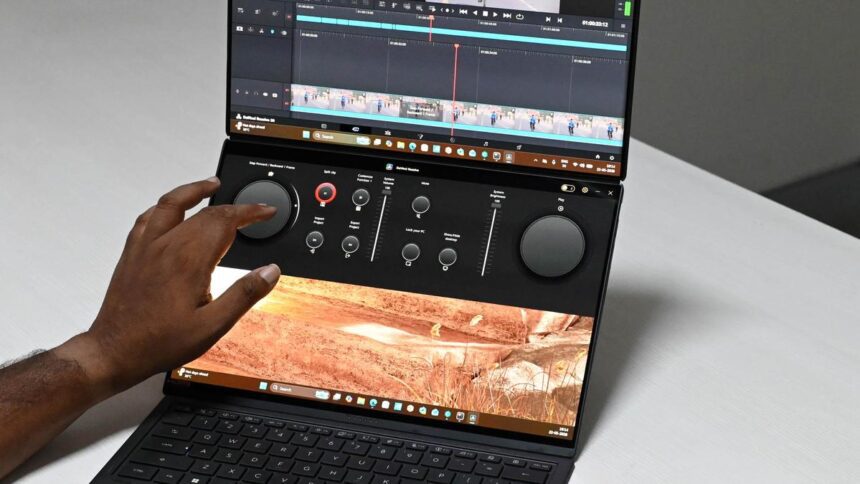
The secondary display, located beneath the detachable keyboard, is equally beneficial. It is well-suited for utility-focused tasks, allowing for features like Asus Dial for volume control or timeline adjustments in applications such as DaVinci Resolve. The kickstand is robust and stable, easily supporting the device during intensive typing sessions in either laptop or stand mode.
Media consumption takes full advantage of the OLED technology, offering rich contrast and deep blacks for an enhanced viewing experience. The dual-screen setup proves valuable for multitasking, enabling users to manage various tasks simultaneously, whether it be tracking stocks, video editing, or drafting content while consuming background media.
For creative professionals, flexibility is key: video editors can split timelines and previews, while designers can utilize the lower screen as a drawing area with the upper display serving as a live canvas. The Zen Pen 2.0 stylus performs effectively across diverse creative tasks and is particularly adept in applications like Photoshop and DaVinci Resolve. Although charging occurs via a USB-C wireless dock, it raises questions about the absence of an in-built USB-C port for charging.
While the device can function as a large-format e-book, its weight diminishes comfort during extended handheld use. Its optimal configurations are in traditional laptop mode or the cascading dual-screen setup, where its design truly shines.
Sound
The audio quality of the ZenBook Duo is solid and well-rounded. It features dual downward-firing speakers and a soundbar situated within the hinge between the two displays. During evaluations with tracks like Anirudh’s Raga of Revenge, the balance of bass and treble was pleasing, with distinct vocal depth and reverb, while percussion was adequately delivered, resulting in an engaging listening experience.
Keyboard and Ports
The ZenBook Duo includes a detachable Bluetooth keyboard with an inbuilt battery, connecting via Bluetooth or pogo pins when docked over the secondary screen. It features a backlit chiclet layout with 1.7mm key travel, promoting a comfortable and responsive typing experience. Keystrokes register accurately, and the backlight is especially beneficial during late-night tasks. The precision touchpad, although plastic-made, provides reliable performance with smooth navigation and consistent click response. Charging options include USB-C or pogo pins, along with a dedicated on/off switch for convenient transport of the keyboard.
Connectivity options are practical and well-balanced. On the left side, it features an HDMI 2.1 port, a Thunderbolt 4 port for charging and high-speed data transfer, and a 3.5mm audio jack. The right side includes a USB 3.2 Gen 2 Type-A port for legacy devices, another Thunderbolt 4 port, and the power button. This arrangement strikes a commendable balance between versatility and everyday functionality.
Performance
The ZenBook Duo is equipped with the Intel Core Ultra 7 355 processor, which has 8 cores and 8 threads, with a base clock of 2.3 GHz and boost speeds reaching up to 4.7 GHz. It is paired with an integrated Intel NPU rated at 49 TOPS, alongside 32GB of LPDDR5X RAM and a 1TB M.2 NVMe PCIe 4.0 SSD, making it suitable for modern workloads.
In synthetic benchmarks like Cinebench R26, the laptop recorded a score of 457 for single-core performance and 2,346 for multi-core performance, placing it competitively alongside processors such as the Core Ultra 7 255H and Ryzen 5800X. While it may not be classified as a high-end performance chip, it manages everyday productivity tasks and creative applications like Adobe Premiere Pro and DaVinci Resolve with commendable consistency.
Though gaming is not its primary focus, the system can handle moderate gaming workloads. Titles like Counterstrike 2 can achieve around 120 FPS, while games such as Minecraft operate smoothly. Thermal management is efficient, with side vents effectively dissipating heat, and the Ceraluminum chassis helps regulate temperatures, though some warmth is felt on surfaces during heavy use. Overall, it provides a balanced price-to-performance ratio tailored for productivity-centric users.
Battery
The ZenBook Duo features a 99Wh, 4-cell Li-ion battery that offers dependable all-day performance under normal usage conditions. In practical scenarios, it lasts approximately 9 to 11 hours for activities like writing, browsing, streaming video, and managing social media. Under demanding workloads—such as gaming or video editing—the battery life is estimated between 2.5 to 4 hours, which aligns with expectations due to the dual-screen architecture and performance requirements.
The device comes with a 100W USB-C fast charger, capable of fully charging the laptop in roughly two hours. ASUS also incorporates an instant charging feature for quick top-ups in less than an hour.
Verdict
In its 2026 iteration, the ZenBook Duo emerges as one of the most innovative dual-screen laptops in recent times. It stands out in design, thoughtful screen integration, and delivers impressive display quality alongside solid performance. Priced at ₹3,06,990, its originality is evident following years of refinement. However, its appeal may be more niche, particularly among creative professionals who might still favor dedicated tools like drawing tablets. Regardless, as a laptop, it remains a highly capable and versatile machine that effectively manages a wide range of tasks.
Asus ZenBook Duo Review
Price: ₹3,06,990.
Pros: Excellent display, decent audio, and sufficient performance.
Cons: High price point, limited use cases.
Published on May 27, 2026